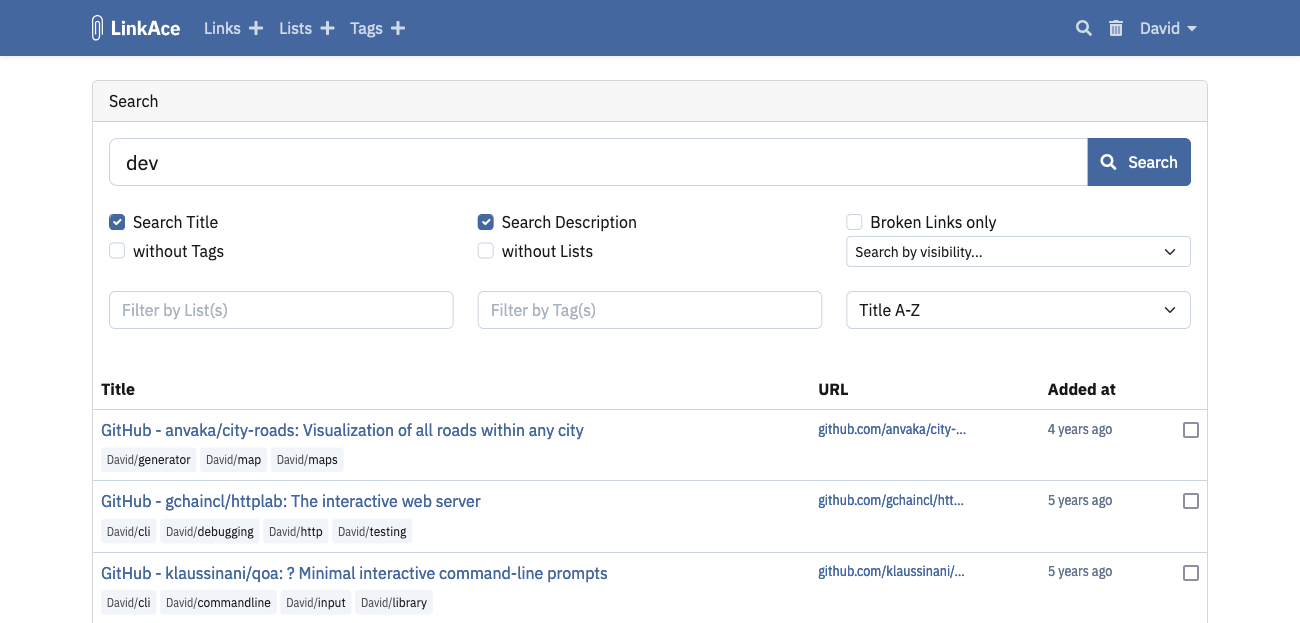
Advanced Search helps you find links by text, status, visibility, lists, and tags. It is available to logged-in users.
Use search when the normal link overview is too broad, when you need links missing organization data, or when you want to find broken links.
Search Backend
LinkAce can use the built-in database search or an external search engine. The default Docker setup uses Meilisearch. Manual PHP installations use database search unless APP_SEARCH_DRIVER is configured differently.
External search engines keep their own indexes. If search results are empty, stale, or incomplete after changing the search driver, restoring a backup, or importing existing data, rebuild the search index from System Settings or with the CLI command:
php artisan search:rebuild
For Docker setups, run the command inside the application container:
docker compose exec app php artisan search:rebuild
Search by Text
Enter a search term in the main search field.
Use the two checkboxes to decide where LinkAce searches:
- Search Title searches link titles.
- Search Description searches link descriptions.
Both are enabled by default. Disable one if you need a narrower result set.
Find Broken Links
Enable Broken Links only to show links marked as broken by automated link checks.
If no broken links appear but you expect some, verify that cron is configured and link checks are running. See Link Checks.
Find Links Without Tags or Lists
Use these filters to clean up unsorted links:
- without Tags shows links that have no tags.
- without Lists shows links that are not assigned to any list.
These filters do not require a text search term.
Filter by Visibility
Use the visibility filter to show only public, internal, or private links.
This is useful before enabling guest access or when checking which links can be seen by other users. See User Management for the visibility model.
Filter by Lists and Tags
Use Filter by List or Filter by Tag to find links assigned to specific lists or tags.
You can select multiple lists or tags. The search form also supports excluding lists or tags, which is useful when cleaning up links that should not belong to a category.
Sort Results
Use the sorting dropdown to order results by:
- creation date,
- URL,
- title,
- random order.
Each sortable field can be ordered ascending or descending where available.
Common Problems
- Search returns no results: confirm at least one search term, list, tag, exclusion, or checkbox filter is set.
- Docker search returns stale or missing results: confirm that the
meilisearchcontainer is running and rebuild the search index. - External search fails after configuration changes: check
APP_SEARCH_DRIVER,MEILISEARCH_HOST, andMEILISEARCH_KEY, then runsearch:setupandsearch:rebuild. - Expected public results are missing in guest search: guest search only sees public content and does not expose private visibility filters.
- Broken-link results are stale: confirm cron is running in System Settings.